


Stack the States® 2
4.6167.00 Reviews
App Specs
- Version
- 2.3
- Updated On
- License
- $2.99
- Downloads
- 10,000+
- Developer
- Dan Russell-Pinson
- Categories
- Educational
- Platform
- Android, iOS
Screenshots
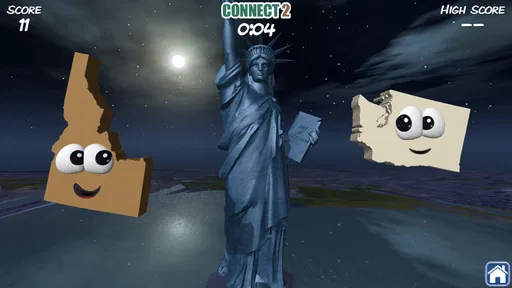
 Analysis by AppCompare
I approached Stack the States® 2 as a learning game rather than as a substitute for a full geography course. Its goal is simple: make recognizing the United States feel like play instead of memorization. After spending time with it, I think that approach works best for children, families, and anyone who wants a light way to build familiarity with states and their locations. It is an educational game from Dan Russell-Pinson, and its focus stays narrow enough to be approachable without turning every session into a lesson.
The app costs $2.99, carries an Everyone content rating, and requires Android 5.1 or later. Those details make it fairly easy to consider for a shared family device, especially when the buyer prefers a paid app over a game built around a more complicated payment model. It was released on August 8, 2016, and the current version is 2.3, so I would view it as an established title rather than a new release chasing the latest visual trends.
How the game feels during a normal session
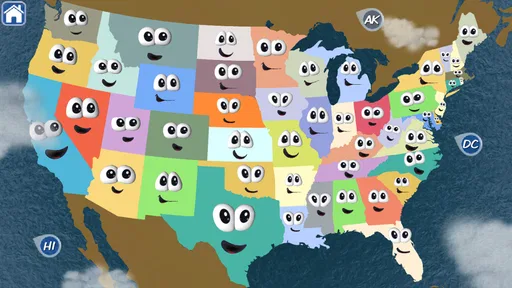
The central appeal is the way geography is turned into an active task. Instead of only reading names from a map, I found myself making decisions, recognizing shapes, and connecting a state with its place in the country. That small change matters. A child who quickly loses interest in a worksheet may stay engaged when the same information is presented as a challenge with visible progress.
The game also works well in short bursts. I would use it during a quiet break, on a family tablet before dinner, or as a quick activity after a child has encountered a state in school. It does not need to occupy an entire afternoon to be useful. A few focused rounds can reinforce a name or location, while repeated play gives the player a chance to notice which states are easy and which ones keep causing mistakes.
My first practical tip is to treat mistakes as a map-reading opportunity rather than immediately supplying the answer. When a child misses a state, I would ask what neighboring states or coastline clues might help next time. That turns the game into a conversation and makes the learning more durable than simply racing through attempts.
Speed without demanding a powerful device
From a user’s perspective, this is the kind of game I expect to feel light rather than technically demanding. Its educational geography focus does not suggest a need for elaborate rendering or a high-end gaming phone. On a compatible device, the important performance question is less about spectacular graphics and more about whether the interface responds quickly enough to keep a child’s attention.
That distinction is useful for parents. A game can be educational and still lose its audience if every action feels delayed. Here, the format is naturally suited to quick decisions, so smooth transitions and readable feedback matter more than visual complexity. I would not choose this title for someone looking for console-style presentation, but I would consider it a sensible fit for an older Android phone that meets the minimum operating-system requirement.
Worth Reading Before You Choose

Flipboard Shows What News Apps Must Do Beyond the Feed

Switching to Android Auto Means Rethinking Your Driving Routine

Google Calendar Makes a Crowded Week Easier to Manage

Ludo King Makes the Most of the Minutes Between Plans

Baby Panda World Brings Quick Play to Modern Phones, but Its Game Library Feels Busy

ESPN’s Live Game View Makes Following Close Games Easier
The age of the release is worth keeping in mind. A title first released in 2016 may look more modest than newer educational games, and users with very recent devices may notice that it is not designed around the newest screen styles or hardware. That does not automatically hurt the learning experience, but it does shape expectations: the strength is the activity itself, not cutting-edge presentation.
What happens when children play repeatedly
Heavy use here is more likely to mean repeated rounds than demanding graphics. A child may replay the same learning loop to improve recognition, compete with a sibling, or gain confidence after getting several answers wrong. That repetition is valuable, but it can also expose the game’s limits. Once the player understands the basic rhythm, the challenge may feel less surprising, particularly for an older student who already knows most of the states.
I would handle that by changing the purpose of each session. One round can focus on speed, another on explaining why a state belongs in a particular region, and another on helping a younger sibling. This keeps the app from becoming a button-pressing exercise. The game provides the prompt, but the adult or teacher can add the deeper reasoning.
A second non-obvious use is to make it a diagnostic tool. If a child performs well with familiar coastal states but struggles with states in the interior, that pattern can guide a short follow-up lesson using a paper map. The app does not have to carry the entire teaching burden. It can reveal where attention is needed, then the family can switch to a different resource for explanation.
That is also where I see a trade-off with ordinary alternatives. A printed map gives more room for context, labels, borders, capitals, regions, and open-ended discussion. A classroom worksheet can be tailored to a specific lesson. This game is more inviting than both for a reluctant learner, but it is less flexible as a teaching document. I would pair it with a map rather than expect it to replace one.
Reliability and day-to-day confidence
The most reassuring part of choosing an established educational title is that the basic concept is already clear. The app is not asking the player to learn a complicated control scheme before reaching the geography. That supports a dependable routine: open it, start a session, and get to the subject quickly. For a child using it independently, that simplicity can be more important than a long feature list.
Still, I would not describe it as a complete learning plan. A game can encourage recognition, but recognition is not the same as being able to label a blank map, explain regional relationships, or recall information without visual prompts. Parents should occasionally check whether the knowledge transfers beyond the screen. Asking the child to point to a state on a separate map is a useful test.
The current version is 2.3, and the app has an average rating of 4.6 from around 468 ratings, with about 167 written reviews. That level of user response suggests that many players find the concept worthwhile, but ratings should not be confused with a guarantee that every child will enjoy it. A learner who dislikes timed or game-like repetition may prefer a slower atlas app, a video lesson, or direct teaching.
My third practical tip is to use the paid purchase as a commitment test. Before buying, decide whether the child will use a short geography game more than once. The price is modest, but the real value depends on repetition. If the app will be opened only once out of curiosity, a free map resource may make more sense. If it becomes part of a weekly learning routine, the focused format is easier to justify.
Device fit, storage expectations, and family use
The minimum requirement of Android 5.1 or later makes the game accessible to a broad range of older Android devices. That is helpful for families passing down a phone or tablet instead of buying new hardware for educational software. I would still check the specific device before purchasing, particularly if the screen is very small or the device is shared with many other apps.
Screen size affects this kind of game more than raw power does. Geography depends on seeing shapes and positions clearly, so a cramped phone display may be less comfortable for a young child than a tablet. A larger screen can also make it easier for a parent to sit beside the player and discuss an answer. In my view, the best setup is a device that can lie flat on a table, allowing the game to become a shared activity instead of solitary tapping.
Resource demands should be considered in practical terms. I would not expect an educational title with this focused purpose to be a major burden on a modern device, but older hardware can behave differently when storage is nearly full or the operating system is struggling. Closing unrelated apps before a learning session is a sensible habit, not because this game should be treated like a demanding action title, but because children notice interruptions immediately.
There is also a family-management issue that has nothing to do with graphics. A paid game is easier to understand than an app that constantly interrupts play with purchase prompts, but parents should still decide whether the child will play alone or with supervision. The strongest results come when the adult occasionally asks the child to explain an answer. Without that conversation, the activity can become a memory test with limited connection to real-world geography.
Who will get the most from it
I would recommend this game to elementary-age learners who need a friendlier introduction to United States geography, parents looking for a focused educational activity, and adults who want to refresh their own state recognition without opening a dense reference tool. It is also useful for a family with different skill levels: a younger player can work on recognition while an older player explains regional clues or checks answers on a separate map.
Teachers may find it helpful as an optional station or a warm-up, but I would not make it the only classroom resource. Its greatest strength is motivation. It gives students a reason to engage with the subject, then leaves room for a teacher to add context about regions, borders, history, and culture.
I would skip it if the learner already knows United States geography thoroughly and wants advanced material. I would also look elsewhere for a broad world-geography course, a detailed atlas, capital-city study, or a tool built around open-ended exploration. The narrow focus is exactly why it is approachable, but that same focus limits its usefulness once the basics are secure.
Value compared with common alternatives
Compared with flashcards, the game feels more active because the player has to respond rather than simply turn over a card. Compared with a worksheet, it offers quicker feedback and less setup. Compared with a general map app, it gives a clearer sense of purpose because the player is working toward a game objective instead of browsing.
The compromise is depth. Flashcards can be customized, worksheets can match a school unit, and map apps often provide broader reference material. This title wins when the problem is motivation and loses when the problem is detailed study. I would use it as the engaging first step, then move to a blank map, a textbook, or a discussion once the player is ready to go beyond recognition.
Another useful comparison is with free educational games. Free options may be easier to try, but they can vary widely in design and may not offer the same focused experience. At $2.99, this app asks for a small upfront purchase. That makes the decision straightforward: pay for a dedicated activity if its style suits the learner, or choose a broader free resource if flexibility matters more than a polished game loop.
My performance verdict
In performance terms, I see a focused, lightweight learning game rather than a demanding entertainment title. Its likely appeal is quick access, simple interaction, and a subject that benefits from repeated practice. The older release date means I would not expect modern visual ambition, but the educational idea does not require it. On a compatible Android device, the main question is whether the learner enjoys this style of repetition.
The game has reached over 10,000 installs, which gives it a useful place among small educational titles without making it feel like an overwhelming mainstream platform. Dan Russell-Pinson keeps the concept specific, and that specificity is a strength when a child needs help becoming familiar with the states. The Everyone rating also makes it easy to consider for mixed-age family use, with an adult choosing how much explanation to add.
My final recommendation is conditional but positive. Buy it if you want a compact way to make United States geography less intimidating and you are willing to reinforce the game with conversation or a physical map. Do not buy it expecting a complete curriculum, advanced challenge, or a replacement for broader geography software. For the right learner, it turns a dry subject into something approachable; for an already advanced student, its focused scope may be too limited.
Overall, I would recommend Stack the States® 2 as a practical supplement, especially for short family sessions and early geography practice. Its best result comes when the screen starts the learning rather than ending it: play a round, discuss the clue, find the state on a separate map, and return later to see whether the memory holds. That workflow gives the modest game much more educational value than simply chasing a higher score.
Pros
- Engaging quizzes make learning U.S. geography feel like a game.
- Covers states
- capitals
- landmarks
- and historical facts in varied ways.
- Bright visuals and animations keep younger learners interested.
- Progress tracking helps children see which topics they still need to practice.
- Works well for short
- focused learning sessions at home or in class.
Cons
- Content is focused exclusively on the United States.
- Some questions may feel too easy for older students.
- Repeated quiz formats can become predictable over time.
- Best suited to children
- with limited appeal for advanced learners.
- Full access may require a purchase or in-app payment.
FAQs for Stack the States® 2
What is Stack the States® 2?
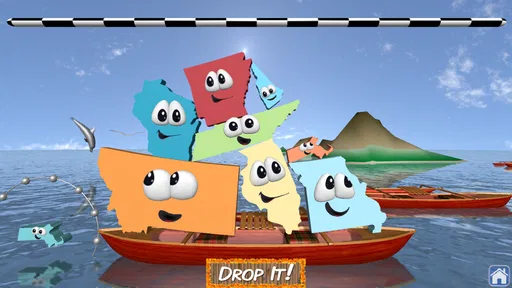
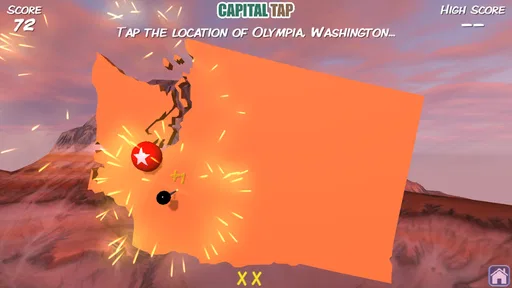
Stack the States® 2 is an educational geography game designed to help players learn about the United States through interactive puzzles and challenges. It combines questions about state capitals, landmarks, geography, flags, and historical facts with a physics-based stacking mechanic. As you answer correctly, you earn state-shaped pieces that can be used to build a stable stack and progress through the game.
What topics can children learn while playing Stack the States® 2?
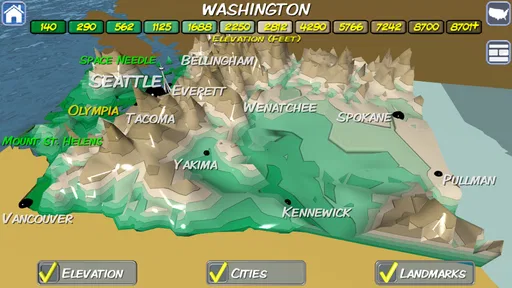
The game covers a broad selection of U.S. geography and civics topics, including state locations, capitals, abbreviations, flags, nicknames, landmarks, borders, and notable facts. The questions are presented in a more entertaining format than a traditional quiz, so children can review information repeatedly without feeling like they are studying from a textbook. It is particularly useful as a supplement to classroom learning.
Is Stack the States® 2 suitable for young children?
Stack the States® 2 is generally aimed at children who are learning basic U.S. geography, although the ideal age depends on the child’s reading ability and existing knowledge. Younger players may need help understanding some questions, while older children can usually play independently. Parents should review the store listing for the current age recommendation, device requirements, and any available family or privacy information before downloading.
Does Stack the States® 2 require an internet connection?
The core gameplay of Stack the States® 2 is generally designed to be playable without a constant internet connection, which makes it convenient for travel, school breaks, or other offline situations. However, certain features may depend on the device’s operating system, app version, or store services. It is best to install and open the game once while connected, then test the main activities before relying on offline access.
Is Stack the States® 2 free to download, and does it include purchases or advertisements?
Availability, pricing, advertisements, and in-app purchase policies can vary between Android and iOS and may change with updates. Before downloading, check the official store page for the current price and purchase information. Because this is an educational game for children, parents should also review the listed privacy details and configure device-level purchase restrictions if children will be playing without direct supervision.


